Factories > Getting started
Warp Factories overview
# Warp Factories overview :::note Warp Factories is in **Early Access** and available to a limited set of teams. [Request access](https://www.warp.dev/factories/request-access) to use it with your team. ::: A software factory takes in requests (bug reports, feature specs, support escalations), and a coordinated fleet of agents works them into a stream of mergeable pull requests instead of a growing backlog. Warp Factories gives you the building blocks, so your team stays in the loop where it matters, approving specs when needed and merging every pull request. ## What is a software factory? In practice, that means tracking each request as a **work item**, such as an issue, ticket, or triggered task, and moving it through specialized agents that triage it, write a specification when one is needed, implement the change, and review the result. A **factory** is one deployed instance of that pattern. It connects your repositories and engineering tools to a team of agents, execution infrastructure, and a measurable workflow. Each factory applies a single policy across all of its work sources, so deploy separate factories for repository groups that need different policies. <figure style={{ maxWidth: "563px" }}>  <figcaption>The general software factory loop. Warp Factories' default agents cover triage through review; add custom agents for the rest.</figcaption> </figure> ## Who benefits from Warp Factories Warp Factories is designed for engineering teams with repeatable work that extends beyond one coding session. Here's where it helps most: * Process a backlog of issues with a consistent triage and delivery policy. * Fix defects reported through support channels. * Review incoming pull requests or maintain services across repositories. ## What you get with Warp Factories * **Coordinated specialist agents** - A team of [factory agents](/factories/factory-agents/) handles each work item. A coordinating foreman routes it through the triage, spec, implement, and review agents, skipping stages that don't apply. You can add custom agents and automations to handle work the defaults don't cover. * **Definitions as code** - [Version-controlled definition files](/factories/factory-as-code/) describe your repositories, agents, automations, runners, skills, and MCP servers, so factory changes get the same review, history, and rollback as code changes. * **Integrations and the Factory MCP** - Work flows in from [Slack](/factories/integrations/slack/), [GitHub](/factories/integrations/github/), [GitLab](/factories/integrations/gitlab/), [Linear](/factories/integrations/linear/), and [Jira](/factories/integrations/jira/), plus direct runs and schedules. The [Factory MCP](/factories/factory-mcp/) connects coding agents and other MCP clients. * **Model and harness choice** - Each agent can use a different model and [supported harness](/platform/harnesses/), including the Warp Agent, Claude Code, and Codex. * **Measurement and self-improvement** - The [factory dashboard](/factories/factory-dashboard/) shows work-item status, runs, automations, costs, and benchmarks. [Scorers](/factories/measure-and-improve/) grade completed work, and [Self-improvement](/factories/measure-and-improve/#configure-and-review-self-improvement) turns repeated failures into follow-up work the factory proposes for review. * **Infrastructure control** - Run on Warp-hosted infrastructure, or self-host execution on an eligible Enterprise plan. Teams can also connect supported inference providers, scope secrets, and (if eligible) store transcripts, artifacts, and run attachments in their own S3 or GCS buckets. See [infrastructure and security](/factories/infrastructure-and-security/) for the available controls. ## How Warp Factories relates to other Warp products | Product | How it relates | | --- | --- | | **Warp** | The interactive terminal where you develop locally with agents and code review. A factory runs independently in the cloud. | | **Warp Agent** | Warp's built-in agent harness. A factory's agents can run on it or on another supported harness. | | **Warp Agent CLI** | Runs the Warp Agent in any terminal and exchanges work with a factory through the Factory MCP. | | **Automation Platform** | Provides the cloud runs, runners, integrations, secrets, orchestration, and APIs that a factory assembles into one workflow. | ## The platform behind a factory Warp Factories is built on the [Automation Platform](/platform/overview/), Warp's programmable system for running and coordinating agents at scale. A factory doesn't replace the platform; it assembles the platform's primitives into one standing workflow, so what you already know about cloud agents carries over: * **Runs** - Every factory agent executes as a [cloud agent run](/platform/), with the same run records and [session sharing](/platform/viewing-cloud-agent-runs/) as any other cloud agent. * **Execution** - [Runners](/platform/runners/) provide the compute each agent works on, and eligible Enterprise teams can route execution to [managed self-hosted workers](/platform/self-hosting/). * **Agent configuration** - Each agent runs on a supported [harness](/platform/harnesses/) and model, with [secrets](/platform/secrets/) and [MCP servers](/platform/mcp/) scoping what it can reach. * **Billing** - A factory's runs consume [platform credits](/support-and-community/plans-and-billing/platform-credits/) the same way as any other cloud agent run. The factory layer adds the workflow on top: the foreman and its agents, work items that carry each request across runs, definitions as code, default automations for connected tools, and the Scorer and Self-improvement loop. A standalone [cloud agent](/platform/) remains the right tool for a single task or a one-trigger automation. Reach for a factory when the work is a standing, multi-stage process your team wants to route, measure, and improve in one place. ## Next steps * [**Set up a factory**](/factories/quickstart/) - Create a factory and send its first work item. * [**Understand the execution model**](/factories/how-factories-work/) - See how the foreman coordinates stages, runs, and human decisions. * [**Meet the factory agents**](/factories/factory-agents/) - See what each agent does and how to configure its model, harness, and instructions. * **Adapt the system** - [Define the factory as code](/factories/factory-as-code/) and [connect its work sources](/factories/connect-your-factory/).Tell me about this feature: https://docs.warp.dev/factories/Warp Factories runs cloud software factories where specialized agents work engineering requests from intake to a mergeable pull request.
A software factory takes in requests (bug reports, feature specs, support escalations), and a coordinated fleet of agents works them into a stream of mergeable pull requests instead of a growing backlog. Warp Factories gives you the building blocks, so your team stays in the loop where it matters, approving specs when needed and merging every pull request.
What is a software factory?
Section titled “What is a software factory?”In practice, that means tracking each request as a work item, such as an issue, ticket, or triggered task, and moving it through specialized agents that triage it, write a specification when one is needed, implement the change, and review the result.
A factory is one deployed instance of that pattern. It connects your repositories and engineering tools to a team of agents, execution infrastructure, and a measurable workflow. Each factory applies a single policy across all of its work sources, so deploy separate factories for repository groups that need different policies.
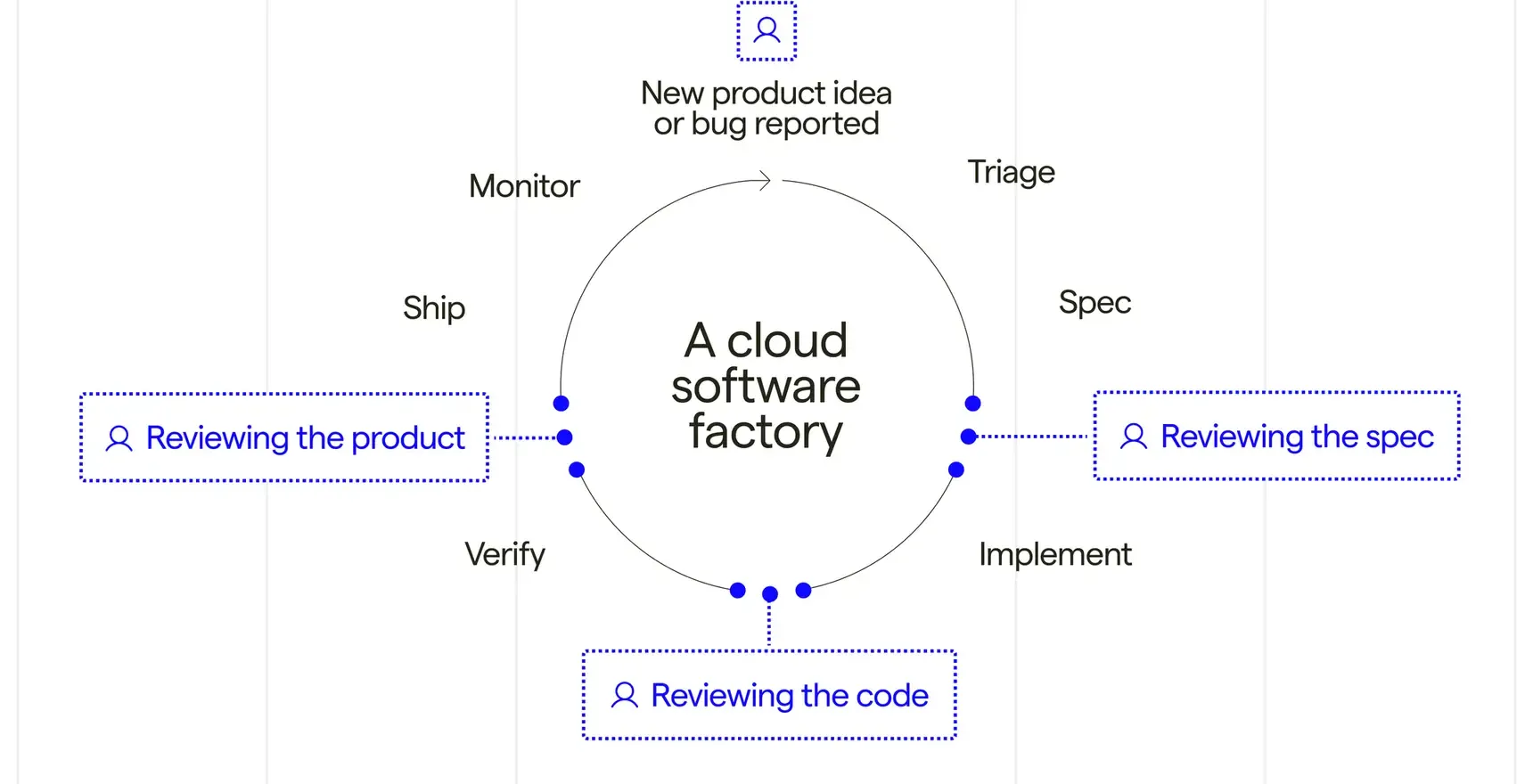
Who benefits from Warp Factories
Section titled “Who benefits from Warp Factories”Warp Factories is designed for engineering teams with repeatable work that extends beyond one coding session. Here’s where it helps most:
- Process a backlog of issues with a consistent triage and delivery policy.
- Fix defects reported through support channels.
- Review incoming pull requests or maintain services across repositories.
What you get with Warp Factories
Section titled “What you get with Warp Factories”- Coordinated specialist agents - A team of factory agents handles each work item. A coordinating foreman routes it through the triage, spec, implement, and review agents, skipping stages that don’t apply. You can add custom agents and automations to handle work the defaults don’t cover.
- Definitions as code - Version-controlled definition files describe your repositories, agents, automations, runners, skills, and MCP servers, so factory changes get the same review, history, and rollback as code changes.
- Integrations and the Factory MCP - Work flows in from Slack, GitHub, GitLab, Linear, and Jira, plus direct runs and schedules. The Factory MCP connects coding agents and other MCP clients.
- Model and harness choice - Each agent can use a different model and supported harness, including the Warp Agent, Claude Code, and Codex.
- Measurement and self-improvement - The factory dashboard shows work-item status, runs, automations, costs, and benchmarks. Scorers grade completed work, and Self-improvement turns repeated failures into follow-up work the factory proposes for review.
- Infrastructure control - Run on Warp-hosted infrastructure, or self-host execution on an eligible Enterprise plan. Teams can also connect supported inference providers, scope secrets, and (if eligible) store transcripts, artifacts, and run attachments in their own S3 or GCS buckets. See infrastructure and security for the available controls.
How Warp Factories relates to other Warp products
Section titled “How Warp Factories relates to other Warp products”| Product | How it relates |
|---|---|
| Warp | The interactive terminal where you develop locally with agents and code review. A factory runs independently in the cloud. |
| Warp Agent | Warp’s built-in agent harness. A factory’s agents can run on it or on another supported harness. |
| Warp Agent CLI | Runs the Warp Agent in any terminal and exchanges work with a factory through the Factory MCP. |
| Automation Platform | Provides the cloud runs, runners, integrations, secrets, orchestration, and APIs that a factory assembles into one workflow. |
The platform behind a factory
Section titled “The platform behind a factory”Warp Factories is built on the Automation Platform, Warp’s programmable system for running and coordinating agents at scale. A factory doesn’t replace the platform; it assembles the platform’s primitives into one standing workflow, so what you already know about cloud agents carries over:
- Runs - Every factory agent executes as a cloud agent run, with the same run records and session sharing as any other cloud agent.
- Execution - Runners provide the compute each agent works on, and eligible Enterprise teams can route execution to managed self-hosted workers.
- Agent configuration - Each agent runs on a supported harness and model, with secrets and MCP servers scoping what it can reach.
- Billing - A factory’s runs consume platform credits the same way as any other cloud agent run.
The factory layer adds the workflow on top: the foreman and its agents, work items that carry each request across runs, definitions as code, default automations for connected tools, and the Scorer and Self-improvement loop.
A standalone cloud agent remains the right tool for a single task or a one-trigger automation. Reach for a factory when the work is a standing, multi-stage process your team wants to route, measure, and improve in one place.
Next steps
Section titled “Next steps”- Set up a factory - Create a factory and send its first work item.
- Understand the execution model - See how the foreman coordinates stages, runs, and human decisions.
- Meet the factory agents - See what each agent does and how to configure its model, harness, and instructions.
- Adapt the system - Define the factory as code and connect its work sources.